

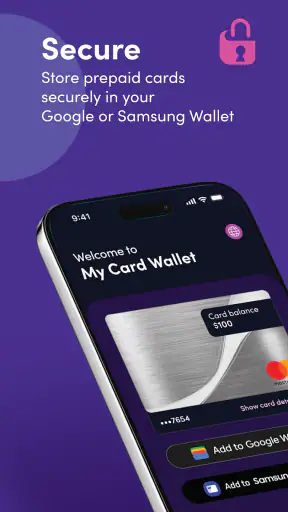
Managing a prepaid card can be surprisingly awkward when the card information is spread across packaging, a banking app, and a digital wallet. My Card Wallet takes a narrower approach: it gives Blackhawk Network’s prepaid-card users one place to manage their cards and prepare them for Google Wallet or Samsung Wallet. I found that focus useful because it avoids pretending to be a full banking replacement. It is a finance app for a specific task, and its value depends heavily on whether your card is supported and whether you prefer keeping prepaid spending separate from your main bank account.
The app is free, available to everyone by age rating, and has built a sizeable audience on Android, with over one million installs. Its average rating is 4.7 from around eighteen thousand ratings, alongside roughly one thousand four hundred written reviews. Those figures suggest that many users find the basic job straightforward, although they do not remove the need to check how well your particular prepaid card fits the app’s workflow.
How My Card Wallet feels to use
Readability and navigation for everyday card management
My first impression is that the app’s narrow purpose works in its favor. Instead of asking me to learn a broad financial dashboard, it centers the experience around prepaid cards and wallet access. That is especially helpful when I am trying to complete one practical task, such as checking a card before shopping or moving it into a supported mobile wallet.
The main benefit is reduced mental load. A prepaid card is often used for a defined budget, a gift, travel spending, or online purchases. Keeping it in a dedicated place can make it easier to remember which balance belongs to which purpose. I would be more comfortable using this app for several prepaid cards than relying on notes in my phone, where card details can become difficult to identify later.
That said, a focused interface is not automatically perfect for everyone. People who expect a full spending timeline, budgeting categories, bill reminders, or bank-account aggregation may find the experience limited. My Card Wallet should be understood as a card-management tool rather than a complete personal-finance center. That distinction matters before installing it, because the app is strongest when the user already knows what kind of financial task they want to handle.
For readability, I would approach it as I would any payment-related app: use a comfortable display size, keep the phone’s text settings at a level that does not make buttons difficult to reach, and avoid rushing through card or wallet prompts. Enlarging text can improve legibility, but on some apps larger system text may cause labels to wrap or controls to become less visible. I would check the important screens after changing display settings rather than assuming every layout will remain equally clear.
The app’s current Android version is 7.3.3.g, and it requires Android 11 or later. That requirement is worth considering for people using an older phone, especially those who keep an older device because its controls are familiar or because it has been configured for easier reading. A newer operating system can be helpful for modern wallet functions, but the minimum requirement may still exclude an older handset that works well for other daily tasks.
Motor and sensory considerations when adding a card
Adding a prepaid card to a mobile wallet is a sequence where accuracy matters more than speed. Users may need to read card information, follow prompts, confirm details, and switch between apps or wallet services. For someone with limited dexterity, tremors, or difficulty with precise tapping, this can be more demanding than simply presenting a physical card at a checkout.
I would recommend completing setup while seated and with the card nearby, rather than attempting it in a queue or while walking. That small change reduces pressure and makes it easier to pause if a field is unclear. It also helps users who need more time to read instructions or who rely on a screen reader, magnification, voice control, or other phone-level assistance. My Card Wallet’s usefulness in these situations depends partly on how well the Android device and the chosen wallet service cooperate with those settings.
For users with visual sensitivities, a dedicated card app can be less overwhelming than a general banking application packed with charts and promotional panels. The limited purpose may make it easier to concentrate on the card itself. However, I would not assume that every icon, contrast choice, or status message will suit every user. People who need strong contrast, very large text, spoken labels, or predictable focus movement should test the core path before relying on the app for an urgent purchase.
Audio-only use may also be difficult if a confirmation depends on visual card information or a visual wallet prompt. Conversely, people who are deaf or hard of hearing may prefer written instructions, but any alert that is primarily signaled through sound could be less useful. The practical lesson is to keep a backup way to identify the card and complete a purchase. A physical card, a trusted companion, or an alternative payment method can prevent a setup issue from becoming a financial problem.
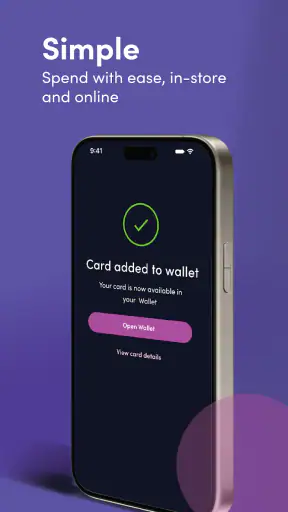
One useful habit is to prepare the card at home and then test the wallet entry before leaving. This is more than convenience. It reveals whether the card appears with a recognizable name, whether the correct card is selected when several are stored, and whether the phone’s lock-screen and wallet behavior are comfortable for the user. I would not wait until a checkout counter to discover that a card was added but is not the one I intended to use.
Situational access: travel, gifts, shared routines, and low-pressure spending
The app makes the most sense in situations where a prepaid card has a clear role. Imagine receiving a prepaid card for a specific household purchase. I could add it to My Card Wallet, move it into Google Wallet or Samsung Wallet when supported, and leave my primary debit card untouched. That separation reduces the chance of accidentally spending from the wrong account and makes the prepaid balance feel more intentional.
It can also help during travel, when carrying several physical cards is inconvenient. A prepaid card reserved for travel expenses can be kept apart from everyday banking cards, while the phone provides a single place to reach it. I would still carry a backup because phone battery, device damage, wallet compatibility, or a merchant’s payment terminal can interrupt mobile payment at exactly the wrong moment.
Gift-card recipients may appreciate the app because they do not need to treat the card like a normal bank account. The dedicated workflow can be easier to understand than opening a traditional banking app and searching through unrelated accounts. For someone who rarely uses financial apps, that simplicity may be reassuring. The trade-off is that a recipient who wants detailed financial planning will eventually need another tool.
There is a less obvious benefit for people who separate spending by purpose. A parent, caregiver, or household organizer might use different prepaid cards for different planned expenses, provided each card is eligible and the account arrangement is appropriate. The app can support a clearer routine than keeping multiple cards loose in a wallet. Still, I would avoid sharing login details or handing over an unlocked phone simply to make a card available. Convenience should not replace basic control over payment information.
For users with cognitive or memory-related difficulties, a card’s purpose can be reinforced by giving it a clear, recognizable place in the phone’s wallet setup. The important part is consistency: use the same naming habit, keep only the cards that are genuinely needed, and remove expired or unused entries when appropriate. The app can support that routine, but it cannot decide which card is safe to use or prevent every selection mistake.
Where the experience still creates barriers
The first barrier is eligibility. My Card Wallet is designed around prepaid cards from Blackhawk Network, so it is not a universal manager for every debit, credit, or gift card. Someone looking for one app to combine cards from different issuers may be better served by the wallet service itself or by a broader financial app. Installing this app before checking the card’s compatibility could lead to unnecessary frustration.
The second barrier is dependence on the surrounding ecosystem. Adding a card to Google Wallet or Samsung Wallet is not the same as simply displaying card information. The phone model, operating system, wallet service, account setup, and payment terminal can all affect the final experience. My Card Wallet can be a useful starting point, but it cannot make an unsupported device or merchant suddenly compatible.
There is also a privacy and security trade-off in storing payment access on a phone. A mobile wallet can be more convenient than carrying plastic, but the phone becomes part of the payment chain. I would use a strong device lock, avoid showing card details in public, and keep the physical card or another backup available. Users who are uncomfortable with phone-based payments may prefer to manage the prepaid card without adding it to a digital wallet, if their card’s normal use allows that.
People with older devices face a practical access issue because Android 11 is required. This is not simply a technical footnote: an older phone may be the device a user has adapted with large text, simplified controls, or familiar accessibility settings. Moving to a newer phone can introduce a new learning curve. Anyone in that position should consider whether the app’s wallet convenience outweighs the effort of changing devices.
Another limitation is that focused design can leave some questions outside the app’s role. If I need detailed explanations about a transaction, card replacement, merchant disputes, or broader account policy, I may need to use the card issuer’s support process rather than expect My Card Wallet to behave like a bank. That separation is reasonable, but it means the app is only one part of the ownership experience.
Who should use it, and who should choose something else?
I would recommend My Card Wallet to someone who regularly uses an eligible prepaid card and wants a simple route toward managing it on a phone. It is particularly suitable for people who want to keep prepaid spending separate from their main bank account, who use Google Wallet or Samsung Wallet, or who prefer a dedicated card-focused experience over a large finance dashboard.
I would be more cautious recommending it to someone who needs one place for bank accounts, credit cards, investments, budgets, and detailed spending analysis. A traditional banking app or a general personal-finance service will usually be a better match for that broader job. I would also hesitate if the user relies on an older Android phone, needs highly customized accessibility behavior, or is not comfortable troubleshooting wallet setup.
Compared with carrying the physical card, the app offers a lighter wallet and a potentially clearer digital routine, but it adds dependence on the phone. Compared with a bank app, it is more focused and less cluttered for prepaid-card tasks, but it does not replace the wider financial picture. Compared with using Google Wallet or Samsung Wallet alone, it provides a card-management path tailored to Blackhawk Network’s prepaid-card context, while the wallet services remain the places where mobile payment is ultimately handled.
My inclusive verdict
After using My Card Wallet as a focused finance tool, I see its main strength in reducing the distance between owning a prepaid card and using it from a phone. The app is free, its age rating is Everyone, and its broad adoption gives it a level of everyday credibility. More importantly, its limited purpose can make a prepaid-card routine easier to explain and repeat.
The best accessibility choice is to prepare the card before you need it. Check the display settings, try the setup without time pressure, confirm that the intended card is visible, and keep a backup payment method. Those steps are especially valuable for users who need larger text, spoken assistance, extra time, or a predictable environment.
My final view is positive but specific. I would choose this app for eligible Blackhawk Network prepaid cards, especially when the goal is organized mobile access rather than full financial management. I would not present it as a universal solution or assume that digital wallet support removes every physical, sensory, or cognitive barrier. For the right user, it is a practical bridge between a prepaid card and a phone; for everyone else, the usual bank or wallet alternative may be simpler.
With its release on March 7, 2018 and continued development through the current version, the app has had time to establish a recognizable role. The developer, Blackhawk Network, keeps that role centered on prepaid-card management rather than expanding it into an all-purpose money app. That restraint is both its clearest advantage and its main limitation, and it is exactly why I would recommend deciding based on your card, your device, and your preferred way of paying.


